
How to download your DoorDash error-charge report, and dispute a charge
When a customer reports an item missing, wrong or not up to standard, DoorDash can take its cost out of your payout and call it an error charge. Its error-charge report lists every one in the dates you pick. Here's how to download it, and where to dispute a charge.
Download the report
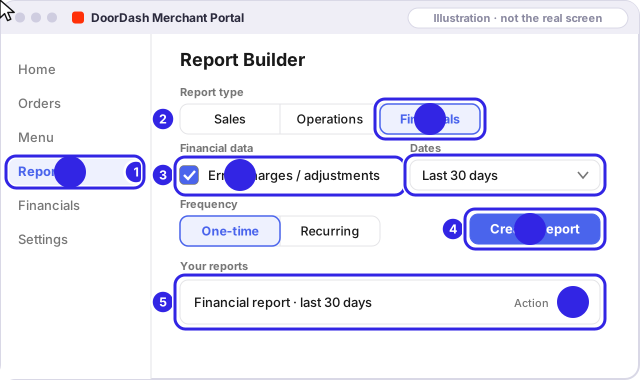
In the DoorDash Merchant Portal, on a computer:
- Open Reports.
- In Report Builder, choose Financials.
- Tick Error charges / adjustments and pick the last 30 days.
- Click Create Report.
- Click the download icon to save the CSV file.
Use DoorDash Drive for deliveries from your own website? Upload the CSV from Drive's monthly invoice email here too, with DoorDash picked, for a free look at refunds, cancellations and returns.
What an error charge costs
DoorDash says an error charge is between 25% and 100% of the item's price, plus tax, for items reported missing, incorrect or of substandard quality. If the Dasher was handed the wrong order altogether, the charge is 100% of the order subtotal plus tax, net of commission.
For things outside your control, like late deliveries, no-shows and food temperature, DoorDash says it refunds the customer and typically doesn't charge you. It also says it absorbs the cost when a customer reports a problem 72 hours or more after delivery. A charge in one of those groups is worth a second look.
Dispute a charge
In the DoorDash Merchant Portal, on a computer (DoorDash's steps):
- Open Financials, then Transactions.
- Filter the transaction type for Error charge.
- Click the order number, then Dispute Charge.
- Tick the items you're disputing and pick a reason from the list.
- Click Dispute Error Charges.
The deadline: DoorDash's page says the delivery must have happened within the last 14 days, so count 14 days from the delivery date. Of the four apps, it's the shortest window, and the one a once-a-month check misses.
DoorDash says it posts a decision on the Merchant Portal within a few hours. There's no fixed limit on how many you can dispute, but a store that disputes a very high volume in a short time can have its Dispute button switched off, usually for up to 72 hours. Closest deadline first, spread over a few days.
More: how DoorDash decides · every app's deadline · what to photograph at hand-off
Sources
Each app's own pages, checked Nov 2026. If a page now says something different, the app's page wins; tell us at hello@getuncomped.com and we'll fix the guide.
Not a law firm · not a substitute for the advice of an attorney · not affiliated with DoorDash, Uber Eats, Grubhub or ezCater
Checked against each app's own pages in Nov 2026. Apps change their rules; if something here no longer matches, email hello@getuncomped.com.