
How to download your ezCater Completed Orders report, and dispute a comp
When an ezCater customer reports a problem, ezCater can give them compensation, a comp, and take it from what the order paid you. The Completed Orders report lists every order and its adjustment, if any. Here's how to download it, and how to dispute an issue.
Download the report
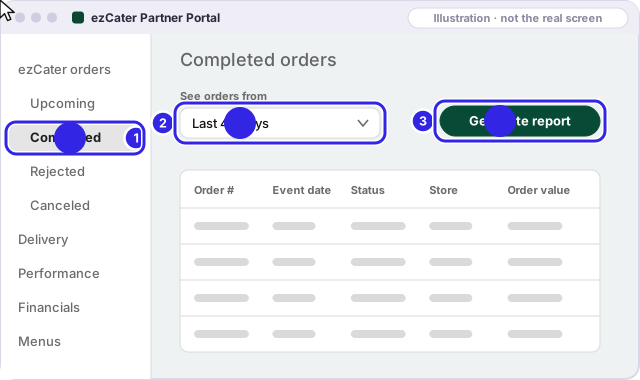
In the ezCater Partner Portal, on a computer:
- Open ezCater orders, then Completed.
- If it asks for dates, cover at least the last 45 days.
- Click Generate report and save the file.
- Open it and save it as a CSV file: in Excel, File, then Save As, then CSV; in Numbers, File, then Export To, then CSV.
We remove the customer's business, address and driver columns before saving your report.
Who pays for a comp
ezCater says it may compensate the customer based on what happened and how they were affected. If your restaurant caused the issue, the comp may be taken from the order. If ezCater or its delivery partner caused it, ezCater covers the cost.
Dispute an issue
In the ezCater Partner Portal (ezCater's steps):
- Open Orders, then Completed, and open the order.
- In the Issues reported with this order box, click Dispute an issue.
- Tick the issues you disagree with, say why, and enter the adjustment you think is right.
- Attach your proof.
The form asks for three kinds of proof: photos of the order or the setup, timestamps from your own systems, and notes about building access or what the customer told you.
The deadline: 45 days, and only one dispute per order, so put every issue on an order into that one dispute. ezCater's page says 45 days "of the order"; the free check counts from the event date. If a deadline is close, go by the order in the portal.
ezCater's Partner Operations team reviews the order, the customer's feedback, your proof and its own delivery tracking and photos. It can keep, change or remove the issue and the comp, and usually answers within two business days. Its support agents can't file the dispute for you.
Sources
Each app's own pages, checked Nov 2026. If a page now says something different, the app's page wins; tell us at hello@getuncomped.com and we'll fix the guide.
Not a law firm · not a substitute for the advice of an attorney · not affiliated with DoorDash, Uber Eats, Grubhub or ezCater
Checked against each app's own pages in Nov 2026. Apps change their rules; if something here no longer matches, email hello@getuncomped.com.