
How to download your Grubhub deposit report, and dispute an adjustment
Grubhub takes the cost of a refunded order out of your deposit as an adjustment. The deposit report lists them, line by line. Here's how to download it, and where to dispute an adjustment.
Download the report
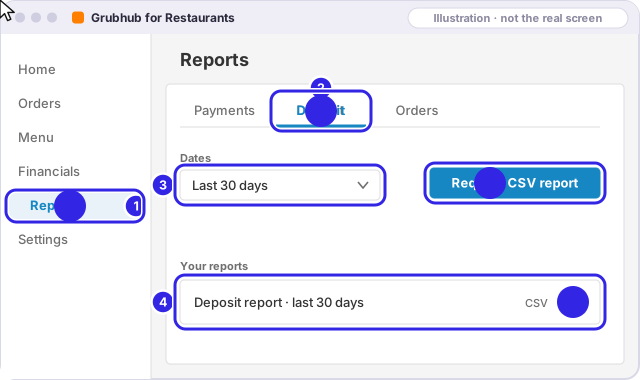
In Grubhub for Restaurants, on a computer:
- Open Financials, then Reports.
- Open the Deposit tab.
- Pick the last 30 days, then Request CSV report.
- When it's ready, click download to save the CSV file.
What Grubhub charges you for, and what it covers
Grubhub's policy page says you're charged for missing items, food made wrong, food quality or safety problems, orders that were wrong or damaged when handed off, and self-delivered orders that were more than 30 minutes late or never arrived.
It says Grubhub covers problems caused by its delivery partners (late, wrong address, damaged on the way, never showed up) and the customer's own ordering mistakes, like a duplicate order or the wrong pickup or delivery choice.
It also says disputes are generally turned down when you didn't confirm or fulfill the order, when you asked for the cancellation, when the order already had a refund or credit, or when a self-delivered order never arrived.
Dispute an adjustment
In Grubhub for Restaurants, at restaurant.grubhub.com (Grubhub's steps):
- Open Financials, then Transactions.
- Pick the dates and choose Prepaid Order Adjustment.
- Click the transaction ID.
- Click Dispute Adjustment.
Grubhub also takes disputes by email at restaurants@grubhub.com or by phone at (877) 799-0790, and says those usually get an answer within about 24 hours.
The deadline: 30 days. Grubhub's page doesn't say which date the 30 days count from, so the free check counts from the order date, the earlier of the two, to be safe.
The page doesn't mention sending photos with a dispute. Keep them anyway: see what to photograph at hand-off.
More: every app's deadline
Sources
Each app's own pages, checked Nov 2026. If a page now says something different, the app's page wins; tell us at hello@getuncomped.com and we'll fix the guide.
Not a law firm · not a substitute for the advice of an attorney · not affiliated with DoorDash, Uber Eats, Grubhub or ezCater
Checked against each app's own pages in Nov 2026. Apps change their rules; if something here no longer matches, email hello@getuncomped.com.